Sensitive Data Exposure
NodeZero attempts to discover and assess potentially sensitive information when a filesystem or service is compromised. Examples include, but are not limited to:
- Business documents in file shares
(.docx,.pdf,.xlsx). - Outlook PST files.
- Confluence RCE.
- Exchange RCE.
When NodeZero gains access to files, it takes different actions depending on the file type. For example, if it finds SSH key or .aws/credentials files, NodeZero attempts to extract those credentials for use in the operation. When it discovers business documents, NodeZero first extracts the text from the documents, and then uses a natural-language processing engine and contextual awareness to look for personally identifiable information (PII) and protected health information (PHI).
Sensitive Data Types
NodeZero currently supports the following protected data types:
- Social Security numbers (SSNs).
- Credit card numbers.
- US bank numbers.
- US individual Tax Identification Numbers (TINs).
- US passport numbers.
- ABA (American Bankers Association) routing numbers
Protection Against Exposure
To protect against accidental exposure of PII or PHI, all of the text extraction, natural-language processing, and contextual analysis happen inside the NodeZero container, which resides in the customer's network on the customer's Docker host. Once a file has been analyzed, NodeZero deletes it from the container. The only information retained is metadata about the exposure. That metadata includes the filename, the file share on which it was located, and the type of data discovered (e.g., credit card number).
Ephemeral File Analysis in Action
As an example, let's say NodeZero discovers a file called customer_invoice.pdf on the C$ share of host 192.168.1.35. The file's discovery will cause NodeZero to execute its sensitive-data routines. NodeZero copies the file from the share to the NodeZero container, which is running on the Docker host in the customer's network.
NodeZero extracts the text from the .pdf, and processes it using pattern matching, natural-language processing and contextual awareness. This leads to discovering a credit card number. NodeZero deletes the file from the container, and reports back that it found sensitive data of type CREDIT_CARD in the file customer_invoice.pdf on host 192.168.1.35 in the C$ share. The actual credit card number is not extracted or used, beyond this initial classification.
Sampling Limits
For efficiency, NodeZero will not look at every file exposed in a share. It obliges limitations on the number of files, and the size of the files, reviewed. In addition, if all other actions are completed, NodeZero will end the operation even if there are remaining files to process. This is done to prevent prolonged operations when large quantities of files are exposed.
Sensitive Data Exposure Results in the Portal
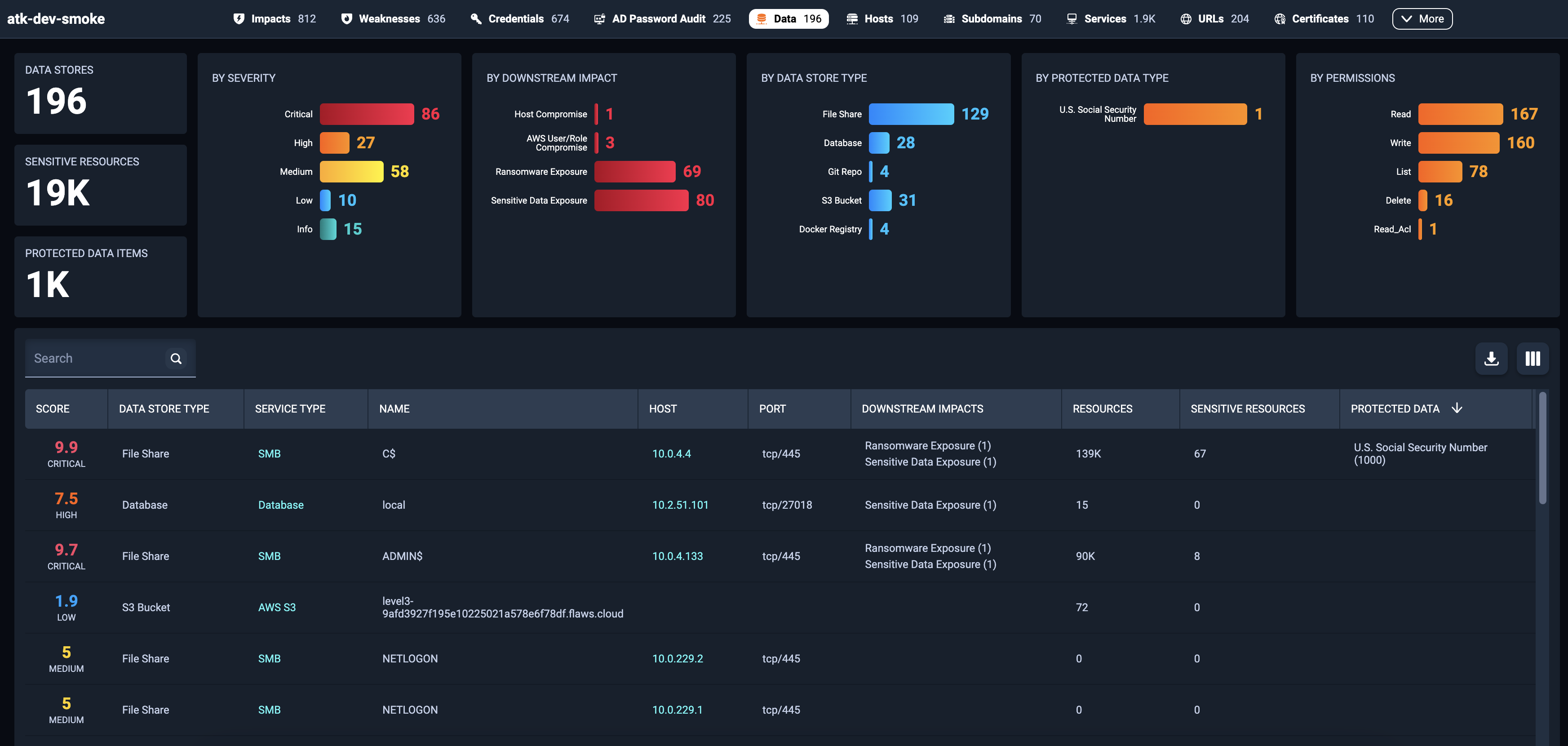
When NodeZero discovers sensitive data exposures, it documents them in the Portal under the Data tab. This tab enables you to browse through exposed data store locations. Records display the data store type, service type, data store name, host location, downstream impacts, number of sensitive resources exposed, and types of protected data exposed (PII/PHI).
Exposure Details
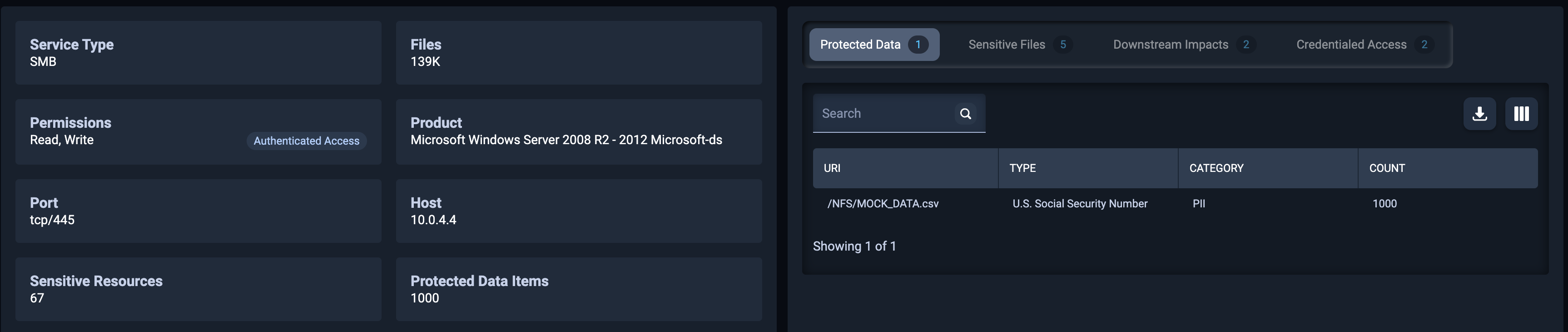
To dig deeper, click on any row. This will display details and examples of the sensitive files, along with the patterns that they matched, downstream impacts, credentials used to gain access, and protected data exposures if any exist. You can use this data to trace back to the origin of the sensitive data exposure. NodeZero cannot tell you what data was exposed because, as outlined above, it does not extract or store the actual contents.