Azure Cloud Pentest
The NodeZero Azure Cloud Pentest is an assumed-breach, black-box assessment that combines Azure API enumeration with an Internal Pentest — letting you assess both your cloud resources and the workloads running on Azure VMs (virtual machines) in a single test. NodeZero is deployed into your Azure subscription using a managed identity, which eliminates the need to provide or inject Azure credentials, however you can still inject Entra users as necessary. This pentest is cloud-to-cloud, so no on-prem infrastructure is required.
NodeZero conducts this pentest in compliance with Microsoft's Penetration Testing guidelines and Security Testing Rules of Engagement.
Before getting started, make sure you are logged into the NodeZero Portal.
Prerequisites
To run an Azure Cloud Pentest, you'll need to set up a connection to your Azure tenant and subscriptions.
Cloud Connector scope
A Cloud Connector represents a single Azure tenant. Each connector can authorize any number of subscriptions within that tenant, but should not span multiple tenants. If you manage more than one tenant, create a separate connector for each.
To set up a connection, you'll also need the following:
- An Entra ID administrator with the role of either Global Admin or Privileged Role Admin, to grant admin consent.
- The role of either Owner or User Access Administrator on all subscriptions you want to authorize.
- The subnet you select at launch must have outbound internet connectivity. NodeZero validates this before the test starts, and will block the run if an NSG or private-subnet setting prevents outbound traffic.
- Your firewall must allow outbound connectivity, as outlined in Network Requirements. It must also allowlist
download.docker.comto enable NodeZero's ephemeral VM to install Docker.
Helpful guides to get you started:
Connector Privileges
The Cloud Connector requires elevated permissions at two levels — Entra ID (tenant) and subscription — to dynamically create and revoke role assignments on the managed identity at launch and teardown. Two of these permissions are high-privilege and deserve careful review before granting admin consent:
High-Privilege Permissions
RoleManagement.ReadWrite.Directory — This Entra ID application permission (displayed as Read and write all directory RBAC settings in the Pemissions requested consent modal shown below) enables the Cloud Connector to assign Global Reader to the managed identity at launch and remove it at teardown. This permission can modify any directory role assignment in the tenant.
Microsoft.Authorization/roleAssignments/write — This subscription-level permission (part of the Horizon3 Cloud Connector Custom Role) enables the Cloud Connector to assign the subscription-level role you choose at launch (e.g., Reader, Contributor) to the managed identity and remove it at teardown. This permission can create role assignments at the subscription scope.
These permissions are required for dynamic role assignment — rather than maintaining a standing privileged identity, the Cloud Connector creates and revokes assignments just-in-time, so that the managed identity holds elevated roles only for the duration of the pentest.
For details about how the connector itself is provisioned and removed, see Set Up an Azure Connection and Delete a Connection.
Recommended: Monitor Role Assignment Changes
We recommend that you follow Microsoft's audit recommendations for logging and alerting on directory and subscription-level role assignment changes:
- Entra ID audit logs — captures directory role assignment changes made by the Cloud Connector service principal.
- Azure RBAC change history — tracks subscription-level role assignment changes in the Azure Activity Log.
- Secure access practices for administrators — Microsoft's roadmap for privileged access monitoring, including PIM and access reviews.
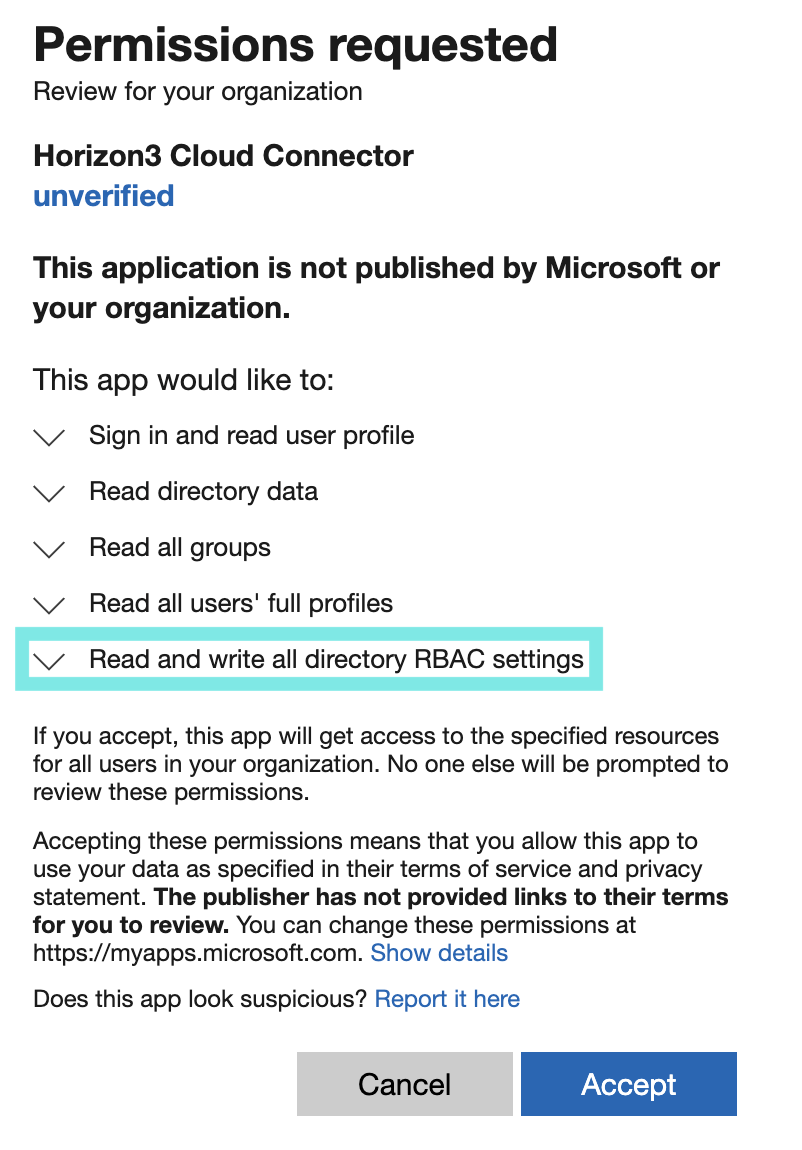
High-privilege permission highlighted in Azure consent modal
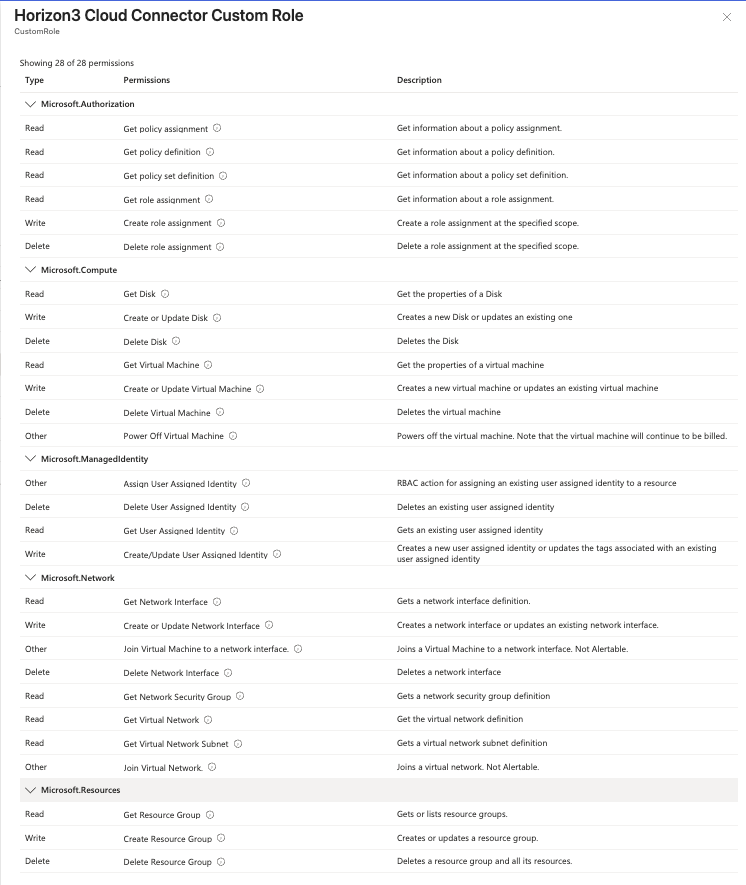
Azure custom role panel – Horizon3 Cloud Connector Custom Role with all permissions listed
How NodeZero Simulates an Assumed Breach
When NodeZero runs an Azure Cloud Pentest, it deploys a temporary 4 vCPU / 16 GB VM into the subnet you select, and uses a managed identity to authenticate against Azure APIs.
NodeZero does not pin a single VM size. It tries a short list of equivalent sizes in order, advancing to the next if Azure reports the current one as unavailable or over quota in your region. Every size in the list is 4 vCPU / 16 GB, so the pentest behaves identically whichever one is used.
| Your VNet's region | Sizes NodeZero tries, in order |
|---|---|
| East US | Standard_D4as_v7 → Standard_D4s_v7 |
| All other regions | Standard_D4s_v6 → Standard_D4s_v7 → Standard_D4as_v6 |
East US uses a different list because the v6 sizes are commonly not offered to subscriptions in that region.
NodeZero creates a resource group named H3-NodeZero-rg-[suffix] containing four resources: a virtual machine, an OS disk, a network interface, and a user-assigned managed identity. Credentials for deploying and cleaning up these resources are generated just-in-time on the Cloud Connector — no long-lived secrets are stored. All four resources are automatically removed when the pentest completes.
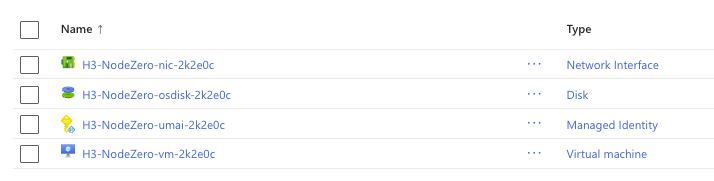
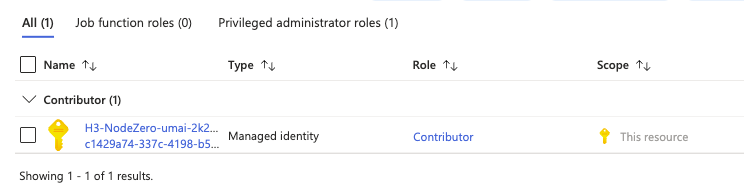
The managed identity receives two IAM assignments, both created dynamically by the Cloud Connector at launch and removed at teardown (see Connector Privileges):
- Global Reader at the Entra ID (tenant) level — for directory and identity enumeration.
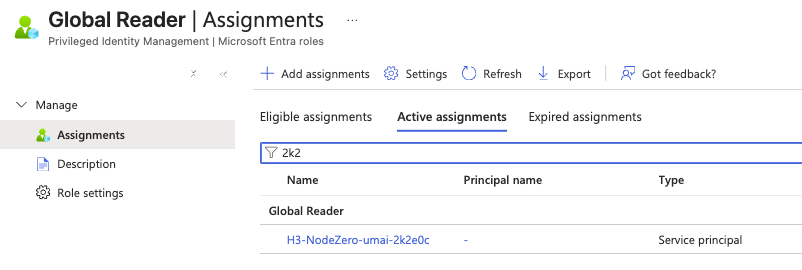
- The role you select at launch (such as Contributor, Reader, or VM Contributor) at the subscription level — this determines the Azure API attack surface for the test.
During setup, a PowerShell script creates the Horizon3 Cloud Connector Custom Role with 28 permissions across Microsoft.Authorization, Microsoft.Compute, Microsoft.ManagedIdentity, Microsoft.Network, and Microsoft.Resources. These are the minimum permissions NodeZero needs to deploy and tear down the test VM.
Among these, Microsoft.Authorization/roleAssignments/write and roleAssignments/delete are what enable the Cloud Connector to dynamically assign and revoke the test role on the managed identity — see Connector Privileges.
Test Configuration at Launch
Keep in mind the consequences of these decisions you make when launching the test:
- The subnet you pick at launch is where NodeZero deploys — not what it tests. The internal portion of the test follows your allow/blocklist just like a standard Internal Pentest, and NodeZero will traverse peering connections if the target IPs fall within your allowed scope.
- The subscription you pick at launch is the only subscription NodeZero enumerates for Azure resources. Entra ID is at the tenant level and is always in scope.
- The role you assign at launch determines the Azure API attack surface. Use Reader to audit a read-only IAM posture, Contributor for deeper gray-box testing, or a custom role to test specific permission sets.